Projects, Tasks & Plans
Organize work into projects with tasks, plans, documents, and goals.
Projects are where BuildOS keeps everything connected. A project holds its own context document, tasks, plans, goals, documents, risks, events, members, and assets — all of the ontology in one place. This page is the day-to-day surface.
Views
Every project has three main views:
- Kanban. Columns represent states or plans. Drag tasks between columns to change status or move them into a different plan.
- Timeline. Gantt-style, keyed to plan start and end dates. Best for deadline-driven work.
- Documents. The context document plus any specs, research, and decisions you’ve attached — in a hierarchy you control.
Use Kanban for flexible, iteration-based work. Use Timeline when the dates matter. Use Documents when you need to read, write, or export the project’s narrative.
Tasks
Every task has a type key — task.execute, task.research, task.review, and so on — that shapes how the agent reasons about it, and a state:
- todo — not started.
- in_progress — actively being worked.
- done — finished.
- blocked — can’t proceed. Usually paired with a note on what’s blocking.
Tasks can come from you (add manually), from a brain dump, or from the agent. They support dependencies so the order is explicit, and they can be scheduled straight to your calendar.
Plans
Plans are typed groupings of tasks with a timeline. The common flavors:
plan.phase.project— classic phased delivery.plan.timebox.sprint— time-boxed sprints.plan.pipeline.sales— pipeline-style flows.
A project can have multiple plans. Tasks belong to one plan at a time, or to no plan at all. Plans can be re-scoped, merged, or closed without touching the underlying tasks.
The context document
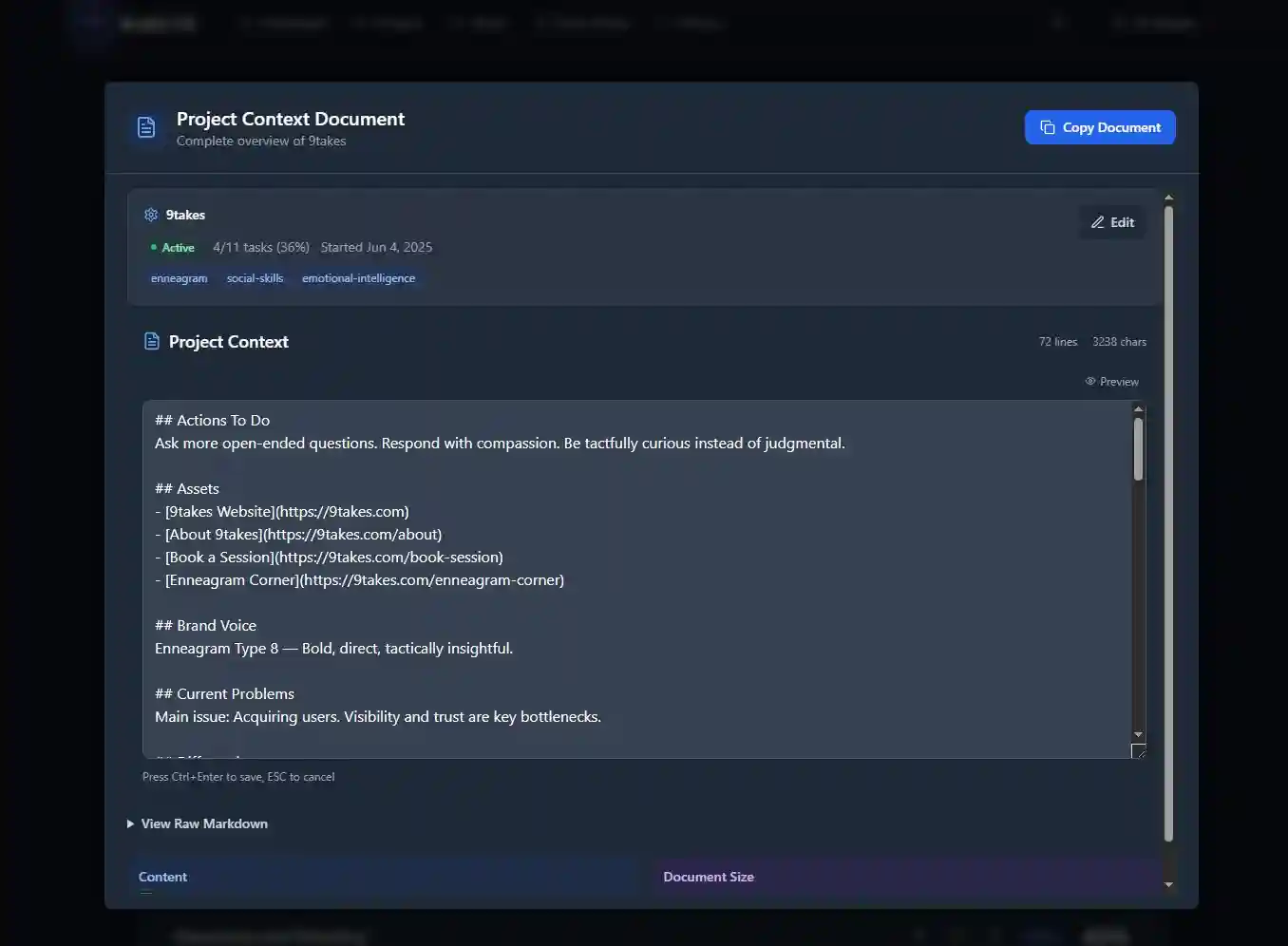
Every project has a context document — the project’s markdown narrative. Goals, constraints, the backstory, key decisions, whatever the agent should remember when it works on the project. It’s the single richest input the agent uses.
Edit it directly in the markdown editor, let brain dumps and the agent write into it, or export it when you need a copy outside BuildOS. Unlike a static notes doc, this one gets updated by anything that touches the project, so it stays accurate without you maintaining it by hand.
Goals, milestones, risks, members, assets
Projects can have any combination of:
- Goals — strategic objectives (“Launch MVP,” “Reach 1,000 users”).
- Milestones — time-based progress markers.
- Risks — known issues with mitigations.
- Members — who’s on the project and in what role.
- Assets — files and images (images are OCR’d so the agent can read them).
Day one, most projects only need a context doc, tasks, and maybe a goal. The rest shows up when the absence starts to hurt.
Public projects
Any project can be published at /p/<your-slug> — a share icon lives on the project list. Public projects get view counts and comments. An index of all your public projects lives at /p/<your-handle>.